Back to home

School projectIndividual work

ET0010 Computer Networking · Mini project

Multi-Site Company Network

The network for a company with a main office and two branch offices, designed and built on my own in Cisco Packet Tracer: the address plan, the routing between sites, backup links and a firewall.

My role
Individual work: design, build and testing
Timeline
AY2026/27, Semester 1
Platform
Cisco Packet Tracer, Cisco IOS
Tools
OSPF, HSRP, ACLs, VLSM subnetting
Network diagram, laid out like the brief's logical diagram. The internet connects to R1, the ISP router. Serial links run from R1 to R2 (border router and firewall) and R7 (backup border router). Inside the main building (OSPF Area 0), R2 and R7 connect to a server switch with the web and file servers, and to the backbone switch, which connects R3 and R5. R5 serves the Administration office. A serial link runs from R3 to R4, the area border router, which serves the Sales office (Area 2) and connects to R6, which serves the Engineering office (Area 1). Main building · OSPF Area 0 Administration office Engineering · Area 1 Sales · Area 2 Internet R1 · ISP router R2 Border router + firewall R7 Backup border router HSRP shared gateway Web server File server R3 To remote offices R5 Admin gateway R6 R4 Area border router
The company network: the main building (Area 0) and two branch offices. Zigzags are serial links.
7routers, all configured by me
3routing areas: the main office and two branches
2×room to grow: every office's addresses can double
0%of test messages lost with the main router switched off

Overview

For my Computer Networking module, I had to design and build the network for ABC Pte Ltd, a pretend IT company. Its main office has the Admin team and the company's web and file servers. Two branch offices, Engineering and Sales, connect to it over a long-distance link, and the main office connects to the internet through an internet provider.

This was individual work, so I did everything: planning the addresses, setting up all 7 routers, adding backups so one failure doesn't take the company offline, adding a firewall, and testing it all. I built it in Cisco Packet Tracer, which simulates real Cisco equipment.
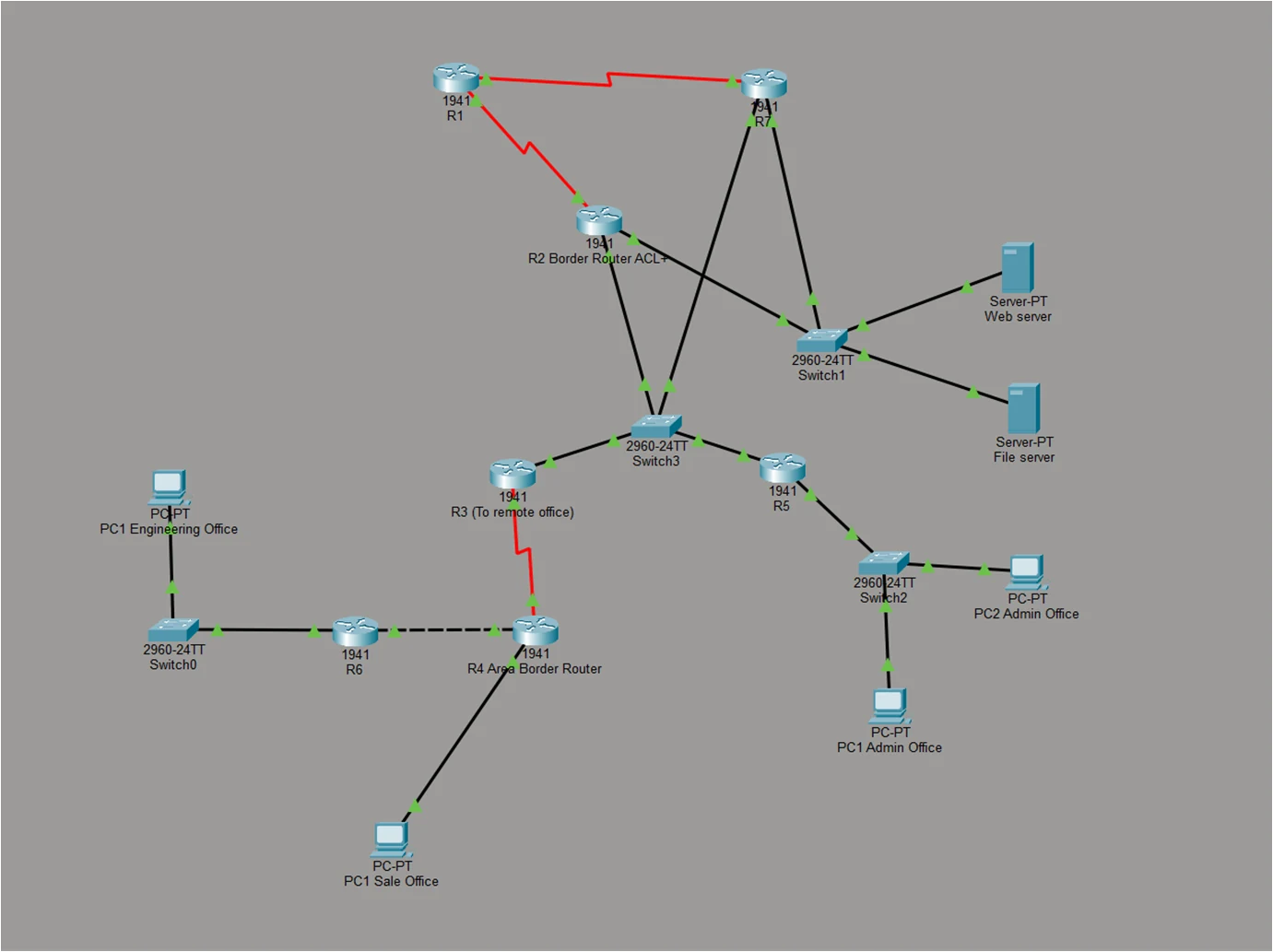
Cisco Packet Tracer workspace showing the finished network: routers R1 to R7, four switches, web and file servers, and PCs for the Admin, Sales and Engineering offices, joined by Ethernet and red serial cables
The finished network in Cisco Packet Tracer. Red lines are serial (long-distance) links.

What I built

01

An address plan with room to double

Every device needs an address, like a phone number. The company gave me one block of 256 addresses, and expects each office to double in size over the next 5–10 years.

I split the block into right-sized pieces (VLSM), each big enough for twice today's staff. The whole network uses 184 of the 256 addresses, so the rest stay free for later.

VLSM · Subnetting · IPv4

How I split the addresses
NetworkAddresses neededSize given
Admin office56 (28 staff, doubled)62
Engineering office46 (23 staff, doubled)62
Sales office22 (11 staff, doubled)30
Servers5 (fixed maximum)6
Main office routers46
Link R3 to R422
Link R4 to R622

Taken from the block 198.100.190.0/24, largest network first.

02

A route to the internet

The internet provider's router (R1) shouldn't learn the company's internal routes, so I set two fixed directions by hand:
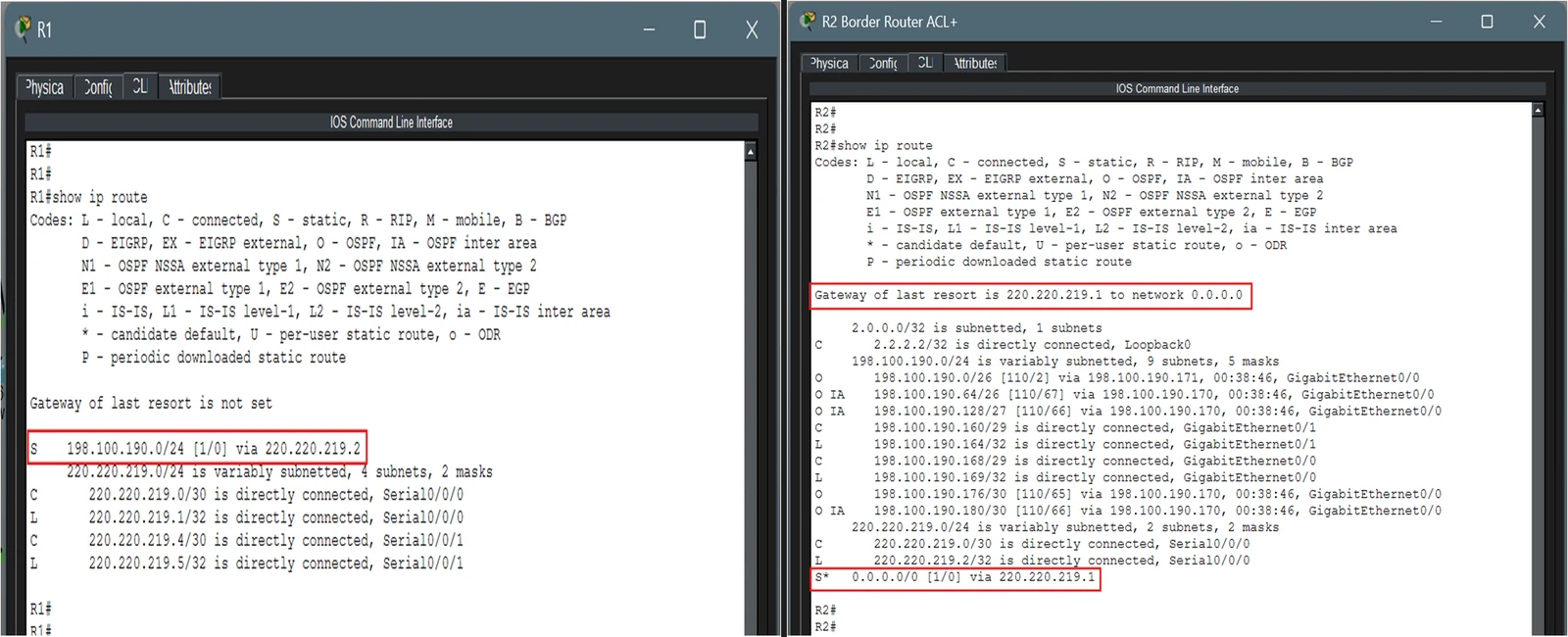
  • R1: "anything for the company's addresses, send to R2".
  • R2: "anything that isn't inside the company, send to the internet" (a default route).

Static routes · Default route

Two router command windows. R1's routing table shows a static route for 198.100.190.0/24 via 220.220.219.2. R2's routing table shows 'Gateway of last resort is 220.220.219.1' and a default static route 0.0.0.0/0 via 220.220.219.1
R1's route to the company (left) and R2's default route to the internet (right), both boxed in red.
03

Three areas that share their routes

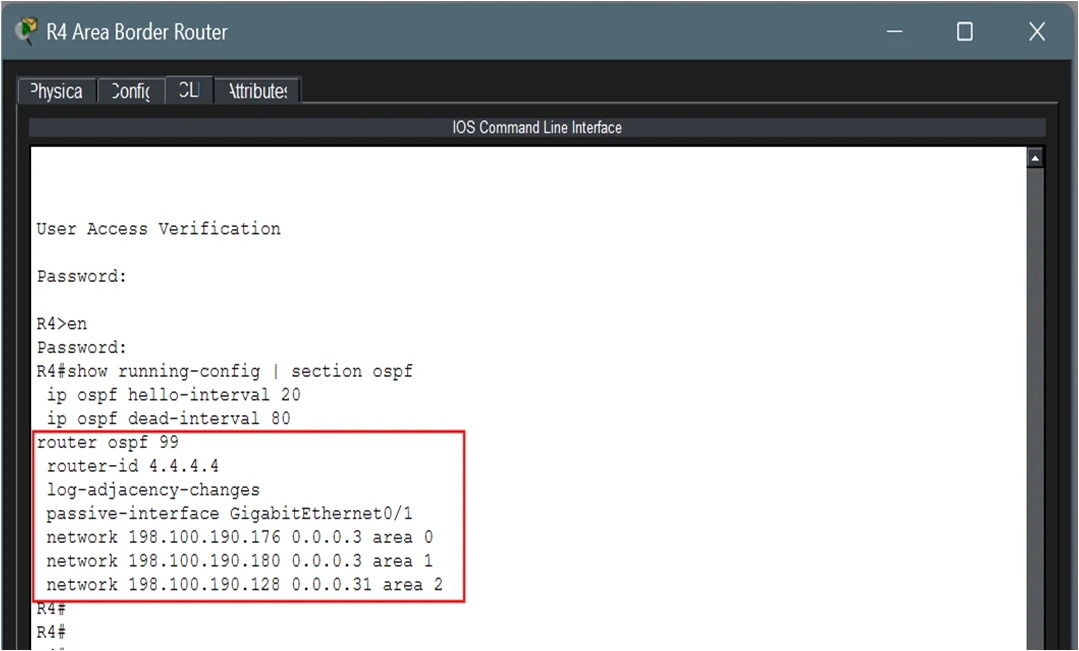
Inside the company, the routers find paths to each other automatically using OSPF, a routing protocol. I split the network into three areas: the main office (Area 0) and one for each branch (Areas 1 and 2). A change inside one branch then stays inside that branch.

R4 sits on the edge of all three areas and passes routes between them. I also stopped routing messages being sent out towards office PCs, since only routers need them.
Multi-area OSPF · Area border router · Passive interfaces

R4 running configuration for OSPF process 99: router-id 4.4.4.4, passive-interface GigabitEthernet0/1, and three network statements in area 0, area 1 and area 2
R4's routing settings: one network in each of areas 0, 1 and 2.
04

A leader for the main office routers

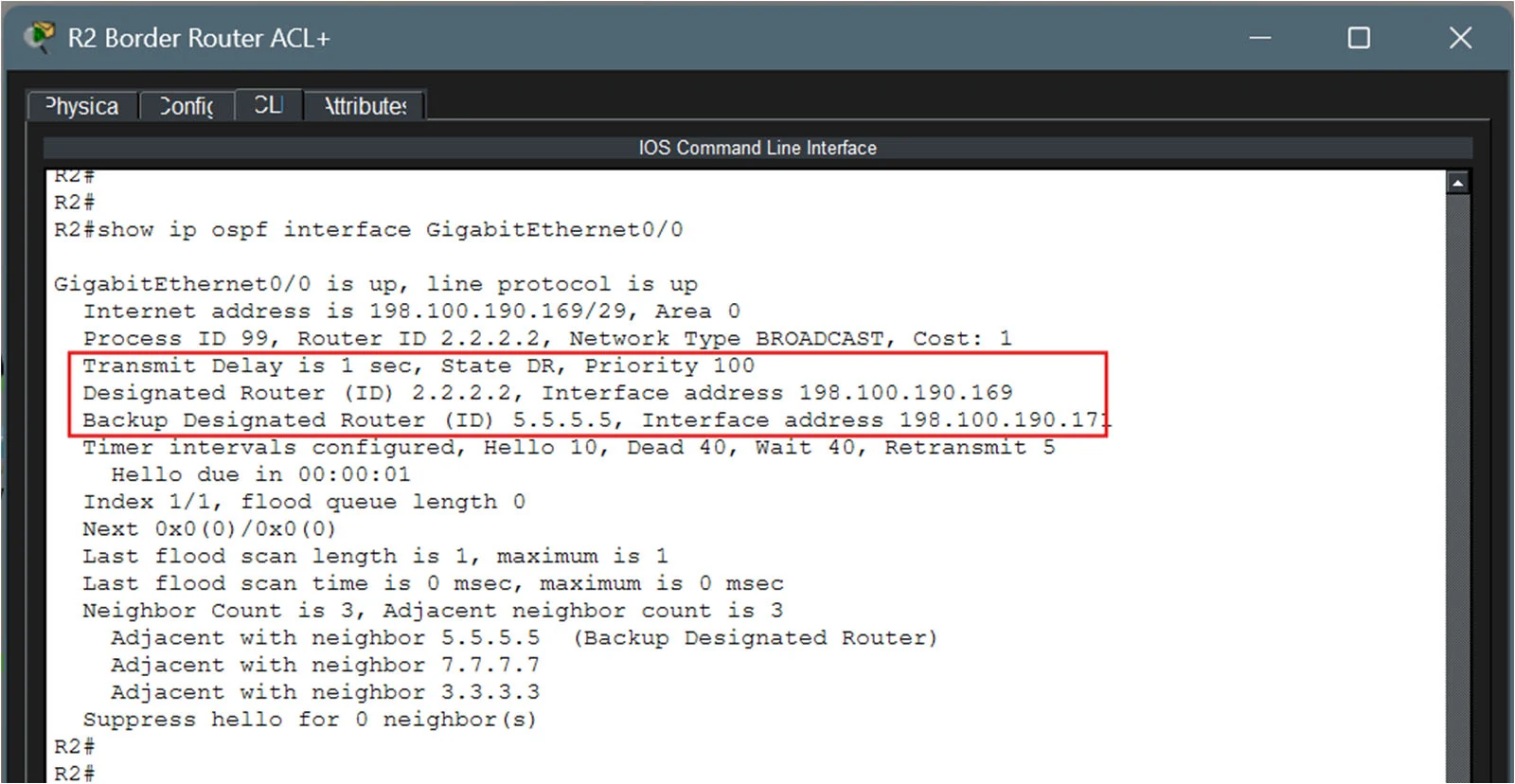
Four routers share the main office network. Rather than every router swapping updates with every other, OSPF picks one leader to collect and share them (the designated router), plus a backup.

I set priorities so the choice is fixed: R2 is the leader and R5 is its backup.
OSPF DR / BDR · Router priority · Loopback router IDs

R2 output of show ip ospf interface GigabitEthernet0/0: State DR, Priority 100, Designated Router 2.2.2.2, Backup Designated Router 5.5.5.5, adjacent with neighbours 5.5.5.5, 7.7.7.7 and 3.3.3.3
R2 is the designated router ("State DR"), and R5 (5.5.5.5) is the backup.
05

Calmer check-ins on the slow link

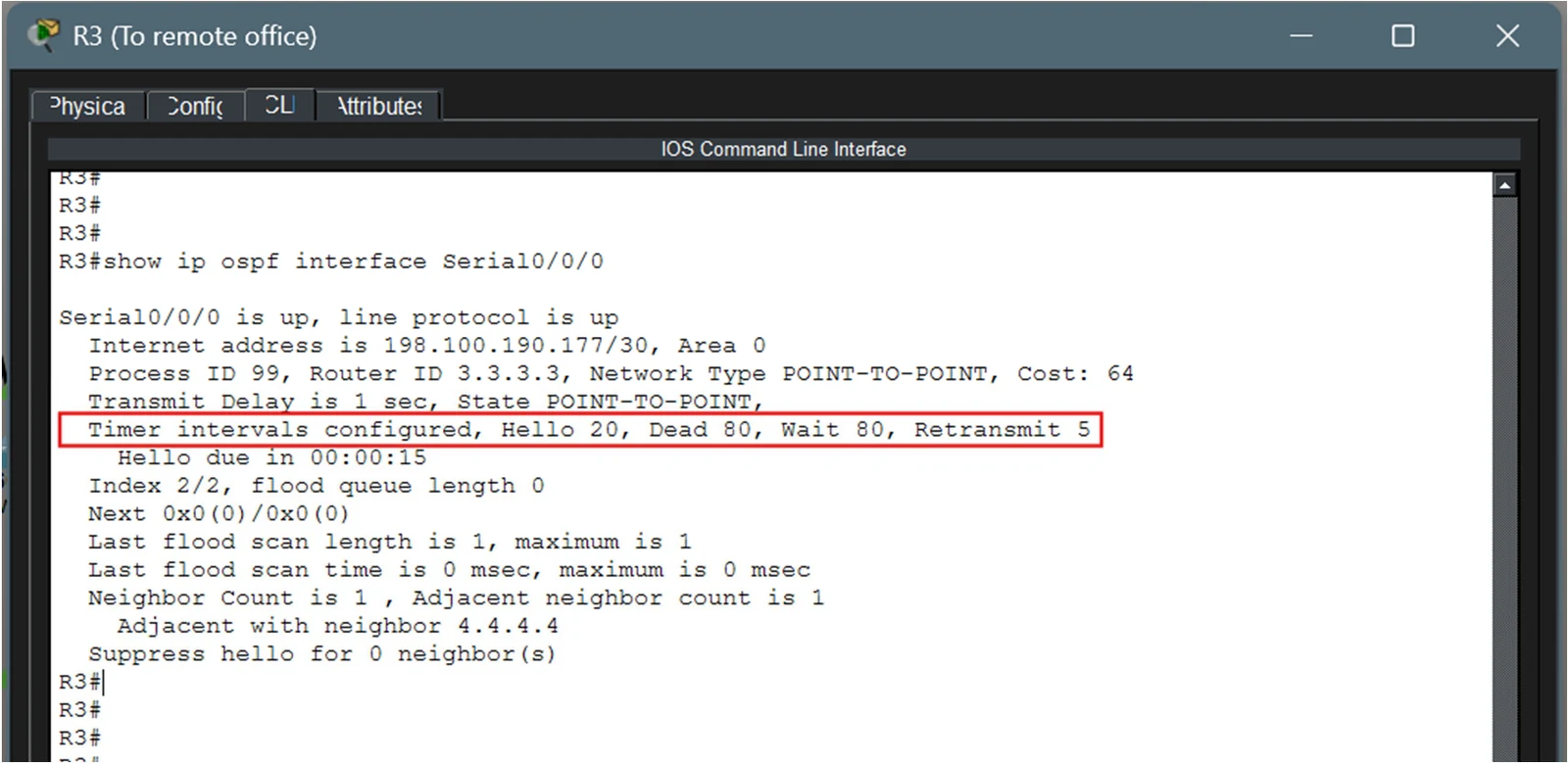
Routers send each other a regular "hello" to show they're still alive. On the slower serial link to the branches, I spaced these out to every 20 seconds, and a router is only treated as down after 80 seconds of silence. This means less chatter on a slow line.
OSPF hello and dead timers

R3 output of show ip ospf interface Serial0/0/0: point-to-point link in area 0, with 'Timer intervals configured, Hello 20, Dead 80, Wait 80, Retransmit 5' boxed in red
R3's serial link: hello every 20 seconds, down after 80 seconds.
06

A backup way to the internet

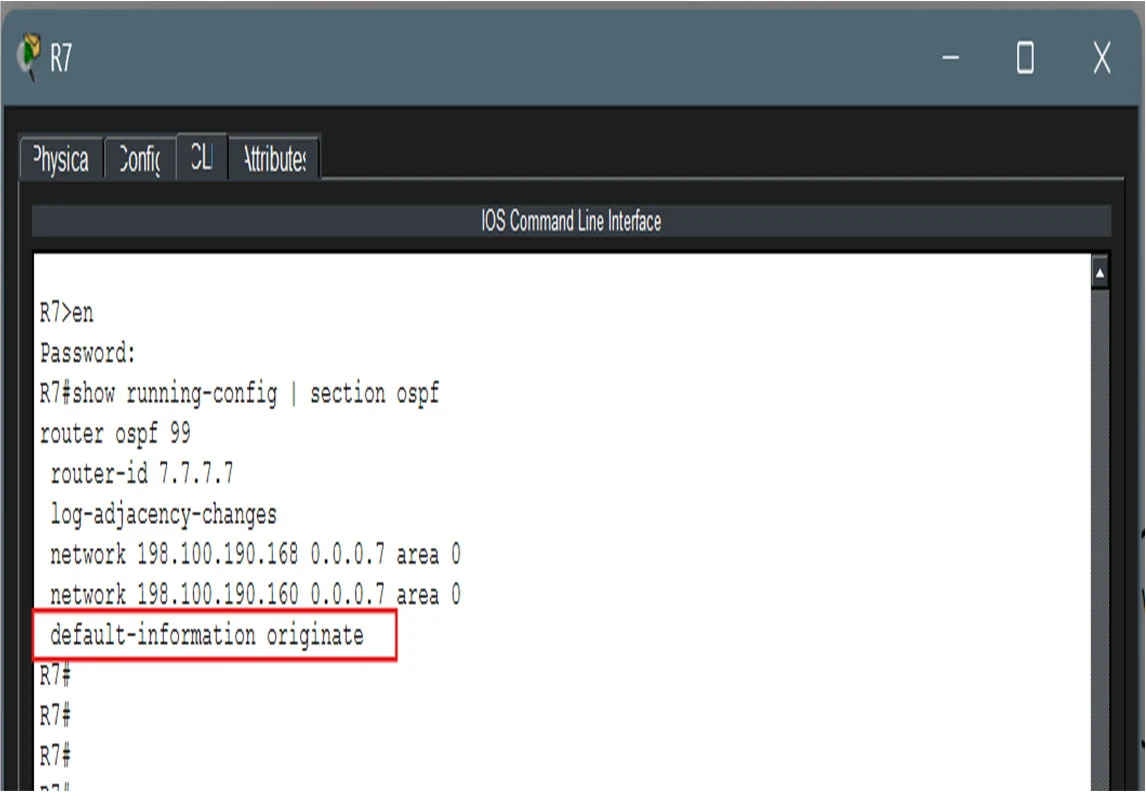
If R2 fails, the company would lose the internet. I added a second border router, R7, with its own link to the internet provider. R7 tells the other routers "you can reach the internet through me too", so traffic switches to it on its own.
Redundancy · default-information originate

R7 running configuration for OSPF process 99: router-id 7.7.7.7, networks in area 0, and 'default-information originate' boxed in red
R7 shares its internet route with the other routers ("default-information originate").
07

Servers that never lose their gateway

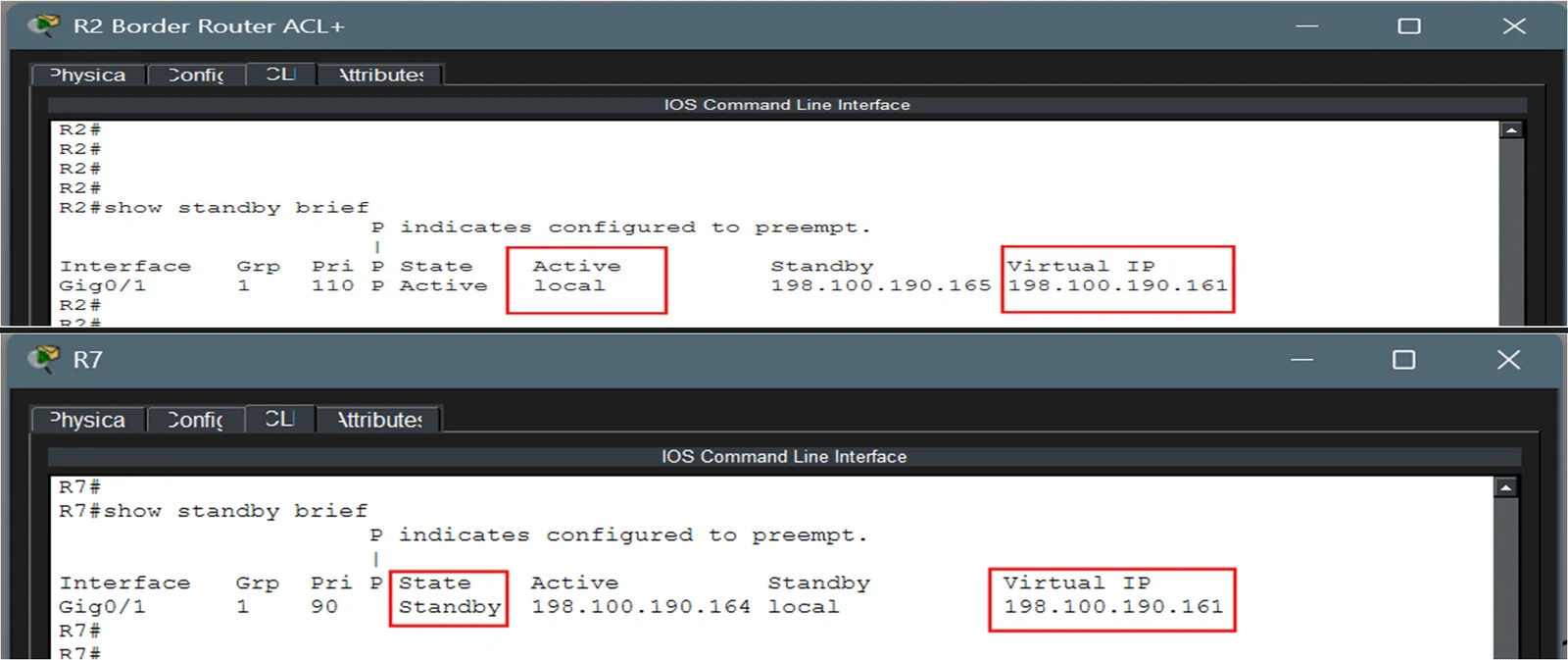
The web and file servers send all their traffic through one gateway address. R2 and R7 share that address using HSRP. R2 normally handles it, and R7 waits on standby. If R2 goes down, R7 takes over the same address, so the servers don't need any changes.
HSRP · First-hop redundancy

Two command windows running show standby brief. R2 shows group 1, priority 110, state Active, virtual IP 198.100.190.161. R7 shows priority 90, state Standby, with the same virtual IP
R2 is active (top) and R7 is on standby (bottom), sharing the gateway address .161.
08

A firewall at the front door

R2 checks every message coming in from the internet against a list of rules (an access control list):
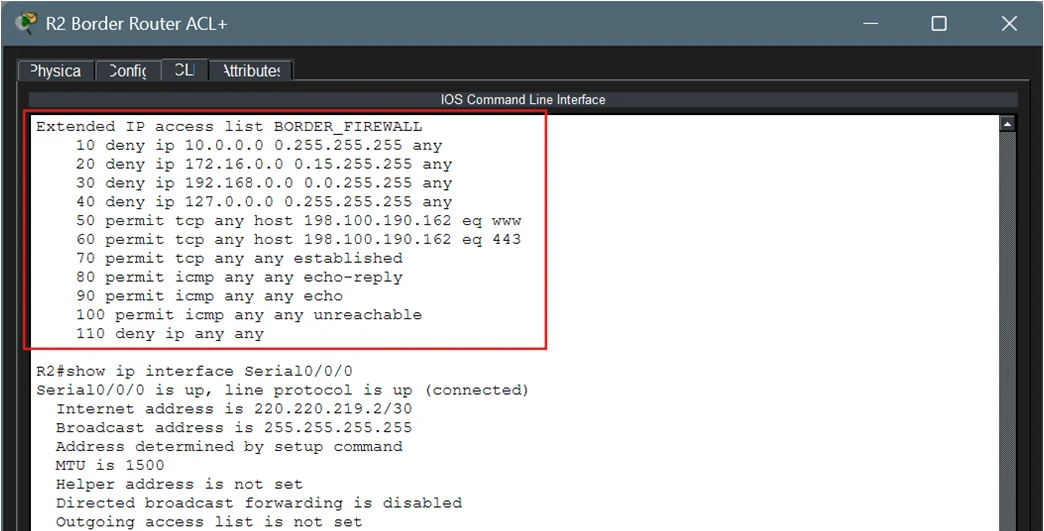
  • Allowed: visits to the company website (web and secure web)
  • Allowed: replies to connections started from inside, and ping tests
  • Blocked: traffic pretending to come from private or fake addresses
  • Blocked: everything else

Extended ACL · Border firewall

R2 extended IP access list BORDER_FIREWALL: deny 10.0.0.0, 172.16.0.0, 192.168.0.0 and 127.0.0.0 sources; permit TCP to host 198.100.190.162 on www and 443; permit established TCP; permit ICMP echo-reply, echo and unreachable; deny ip any any. Below, the list is applied inbound on Serial0/0/0
The firewall rules (boxed), applied to traffic coming in on R2's internet link.

Tested

Every office can reach every other

From a PC in the Admin office, I sent test messages (pings) to the Engineering office, the Sales office and the web server. Every message got a reply, with none lost.
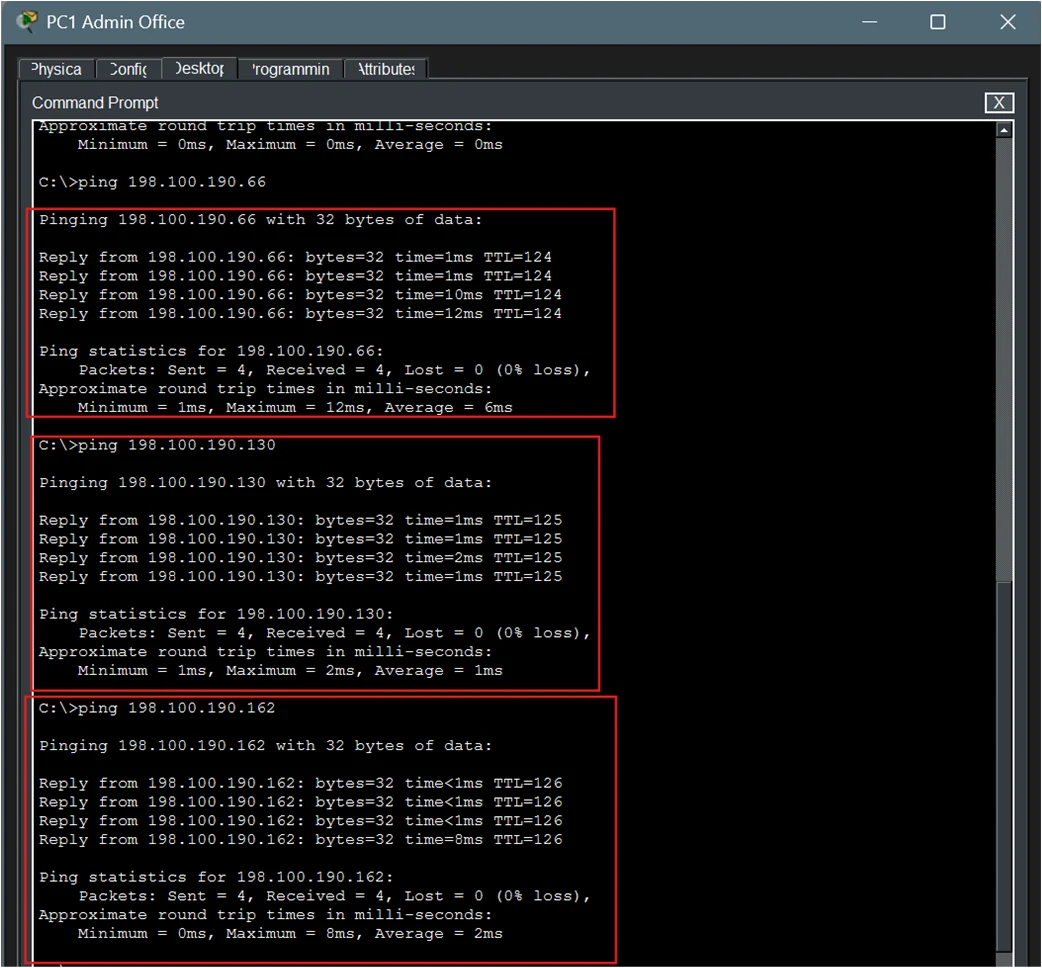
  • Engineering office: 4 of 4 replies
  • Sales office: 4 of 4 replies
  • Web server: 4 of 4 replies
Admin PC command prompt pinging 198.100.190.66, 198.100.190.130 and 198.100.190.162, each with 4 replies and 0% loss
Pings from the Admin PC to Engineering (.66), Sales (.130) and the web server (.162): 0% loss.

Still working with the main router switched off

A backup only counts if it works, so I turned R2 off in the simulator and tested again. The offices could still reach each other, and the internet provider's router was still reachable through the backup router, R7.
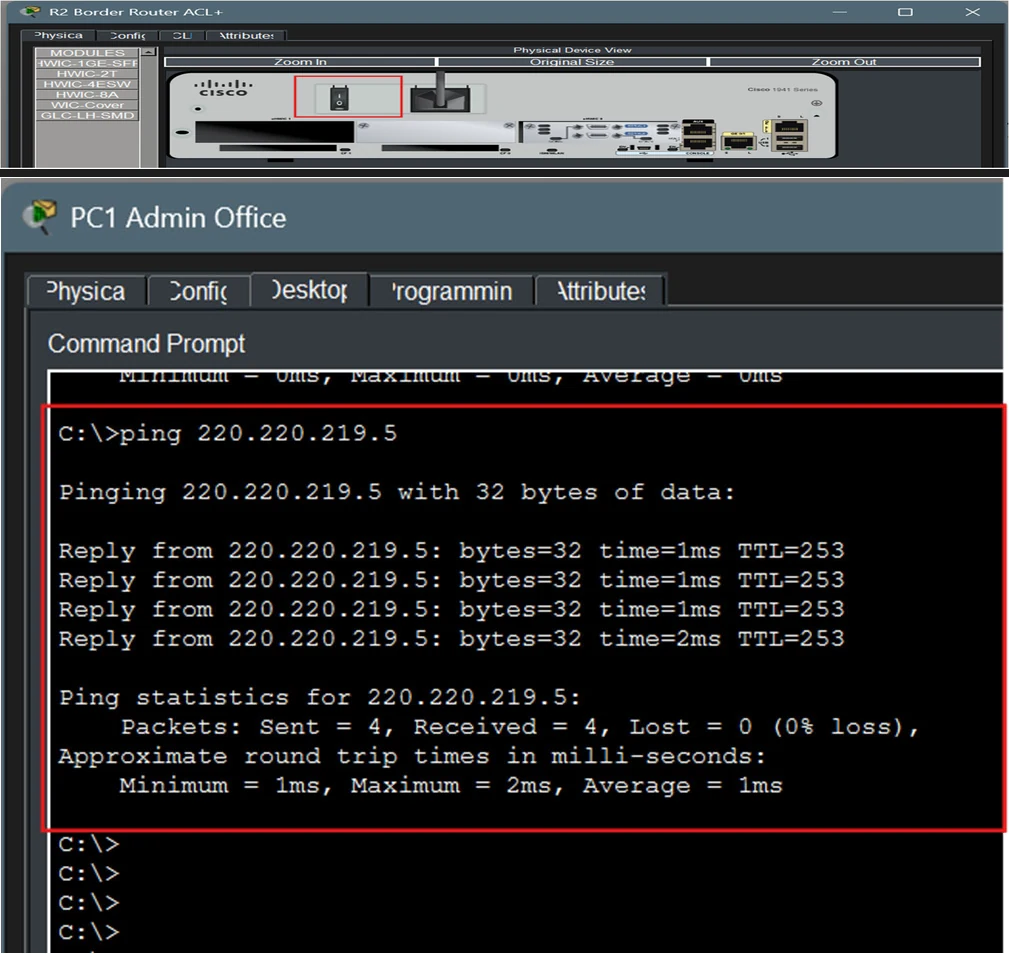
  • Offices and servers: still reachable, 0% loss
  • Internet provider (via R7): 4 of 4 replies
Top: Packet Tracer physical view of R2 with its power switch boxed in red. Bottom: Admin PC pinging 220.220.219.5, the ISP router's link to R7, with 4 replies and 0% loss
R2's power switch turned off (top), and the Admin PC still reaching the internet provider through R7 (bottom).

Cost and next steps

What it would cost

I also estimated the cost of building it for real: about S$22,780, mostly the 7 routers and the 2 servers.

Budget estimate
ItemQtyCost (S$)
Cisco 1941 routers710,500
Cisco 2960 switches53,500
Rack servers (web, file)25,000
Internet lines (main + backup)21,200
Cables—580
Installation and testing12,000
Total22,780

What I'd improve next

A second internet provider

R1 is still the only way out to the internet. A second, separate provider would remove that single point of failure.

Backup gateways for every office

HSRP only protects the servers today. Adding it for the Admin, Sales and Engineering offices would protect everyone.

Tighter security

Encrypted remote logins (SSH instead of Telnet), passwords on routing messages, and locking switch ports to known devices.
What I learned

  • Plan the addresses first. Once the address table was right, setting up each router was straightforward. A mistake there would have spread everywhere.
  • A backup isn't real until you test it. Switching R2 off was the only way to prove that R7 and HSRP actually take over.
  • Areas keep routing tidy. Splitting the network into areas means a change in one branch doesn't make every router recalculate.
Next project BusGuard